Project Tracker Log in Start free trialStart free

After mobile first comes AI first

Task tracking that is AI first.

Ask “what should I do today?” and get a short, curated focus list with a reason for each. Your team's AI assistant works in the same board, planner and time sheets as your people — claiming tasks, logging time, writing the project notes — while everyone stays in charge. A calm alternative to Jira, and every action is still a button, so nobody is forced to use AI.

7-day free trial · no credit card · from €10 per seat per month

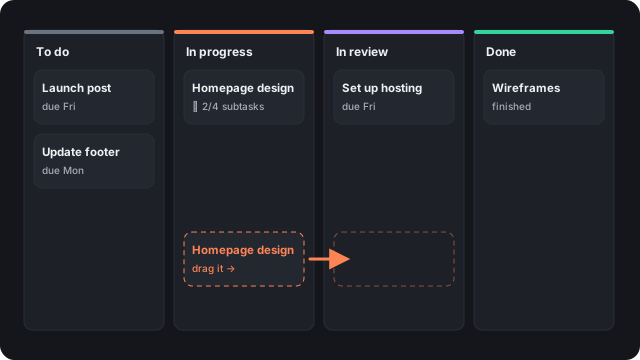
A board with columns To do, In progress, In review and Done, and a card being dragged between them

Made in the Netherlands, priced fairly

Six things you can count on.

📍

Hosted in the EU

Your workspace lives on a server in the Netherlands, in a database of its own. Your tasks and hours do not travel to the other side of the world.

🏢

A Dutch company

Built and run by CreatieRocket in Utrecht. Dutch law applies, invoices are in euros with Dutch VAT, and the whole product speaks Dutch and English.

⚖️

Fair payment

You pay for the seats you actually had, day by day, after the month has ended. Someone joins on the 20th? You pay for their ten days. Guests are always free.

🧩

Every feature, always

One plan, no tiers. The board, planner, time tracking, teams, reports and the AI connection are all included. Nothing is held back for a bigger plan.

🔌

Pay only for the AI you like

We do not resell AI. Use the Claude or ChatGPT you already have, or none at all. There is no AI surcharge, so the price is the same whether anyone uses it or not.

🔒

Your data stays yours

Download everything whenever you like. When someone leaves, they lose access at once, and when they ask to be forgotten, their name is gone everywhere.

An AI that works on your plan, not next to it

Because the assistant lives in the same place as your projects, deadlines and hours, it already has the whole picture. You do not paste context into a chat, and you do not dig through boards to find the answer.

Answers in seconds

“What should I do today?” becomes a short focus list with a reason for each item, instead of twenty minutes of scanning.

Oversight you do not have time for

Who is overloaded, which deadlines are at risk, what is stuck: it reads everything and gives you the short version.

Work done with the context

Turn an email into tasks, shift deadlines, log your hours. It knows the projects, so you do not explain them. Prefer buttons? Everything works without it.

Your AI assistant
Tracker · Today

Your focus today

Send the brochure files to the printerDeadline is tomorrow, and the printer needs a day
Review Sanne’s homepage designSanne has been waiting for you since Monday
Reply to Acme about the extra pagesIt changes the budget; they decide on Friday

To do

Update the footer links

In progress

Photos for the homepage
Call the printer about the brochure HighFri 24 OctS

Jira's power, without the weight

Most teams use a tenth of Jira and pay for the rest in clutter. This is built the other way round: the useful things up front, everything else out of the way until you ask for it.

🧘

Calm by default

Each person chooses what shows in their menu — start with three pages and add more as you need them. Features stay hidden until you ask, but always searchable.

🖱️

Everything is a button

Nothing needs a script, a query language or an assistant. New people get a first-time tour, and an (i) next to anything unclear explains it with a picture.

🤖

AI first, never AI only

Connect Claude or ChatGPT: it signs in as the person who connects it and sees only what they see. It reads, plans and updates alongside your team. Prefer not to use AI? Every step has a button.

What is inside

The everyday work of a team, in one place.

A board that behaves

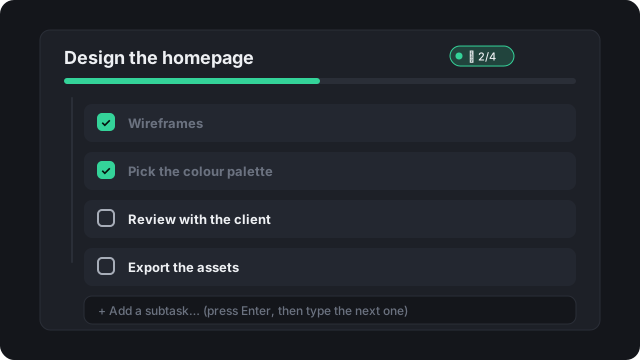
Drag a card to another column to change its status. Split big tasks into subtasks with a progress bar, tag them, and see what is waiting on what.

  • Board, list and a dense table you can edit in place
  • Subtasks, tags, dependencies, progress counters (“12 of 400 printed”)
  • Saved views pinned in your sidebar
A task with four subtasks, two of them ticked, and a progress bar

See who has room — before it is a problem

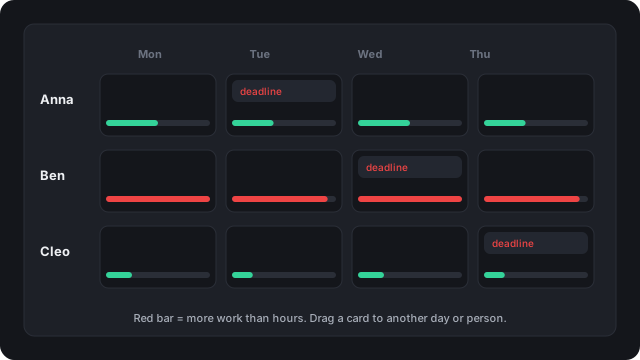
The planner spreads each task's estimated work between its start and its deadline and shows, per person and per day, who is overbooked and who has space. Drag a card to reschedule; undo is one click.

A planner with a column per person and a load bar per day

Track time on purpose, bill it with confidence

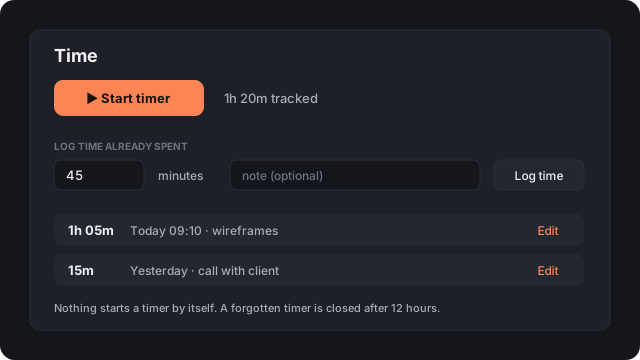
Start a timer or log time you already spent — nothing starts behind your back. Reports by project, client, person or day, and a client-ready PDF overview in one click.

  • Estimates and “running over” warnings
  • CSV and PDF exports
A timer, a form to log time already spent, and a list of entries

Teams, clients and freelancers — each seeing only what they should

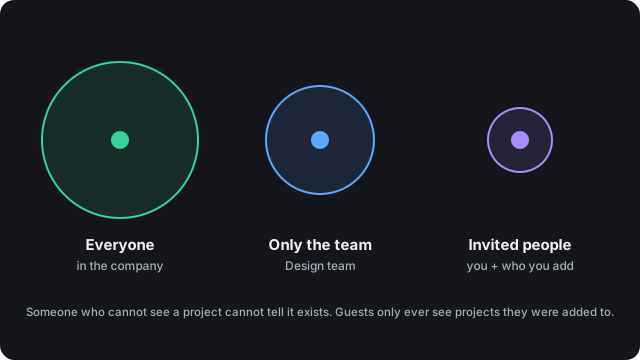
Put projects in teams, open them to the company, or keep them invitation-only. Invite clients and freelancers as guests: they see just the projects you add them to, and they are free.

Three levels of project visibility: everyone, one team, invited people

Up and running in minutes

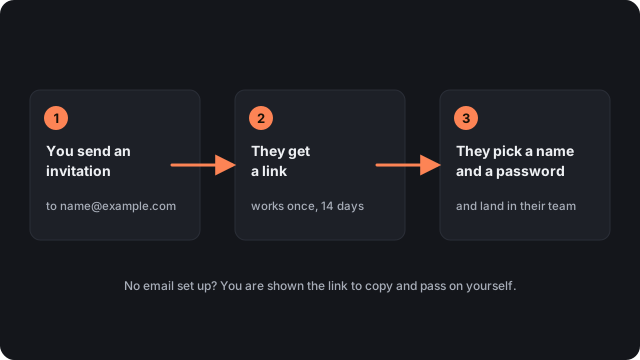
Sign up, answer four short questions, invite your people by email. They choose a name and a password and land in the right team. Your data stays your own: each company lives in its own database, and you can download all of it whenever you like.

Three steps: you send an invitation, they get a link, they pick a name and password

One plan. Everything included.

One plan, no tiers, no “contact sales” for the basics. Optional extras, like your own branding on client reports, are priced separately.

€10 per seat / month
including VAT · cancel any time
  • 7-day free trial, no credit card needed; then pay to keep editing
  • Guests are free: clients and freelancers you add to a project
  • Billed at the end of the month for the seats you actually had, day by day: people who join or leave mid-month cost only their days
  • Every feature, always: board, planner, time reports, teams, invitations and the AI connection
  • No AI surcharge: bring your own Claude or ChatGPT, or none at all
  • Download your data any time
  • Optional extra: your own logo and colours on client reports (one-time setup fee)
Start free trial

Questions

Do we have to use AI?

No. The product is built AI first, but everything also works with buttons. If your company uses Claude or ChatGPT, it can connect, then read and update tasks as the person who connected it — and it can only see what that person sees. If not, nothing is missing.

Which AI works, and what does it cost?

Claude and ChatGPT work today. You use the subscription you already have with them; we charge nothing extra for AI, so the price per seat stays the same.

Can clients and freelancers use it?

Yes, as guests. A guest sees only the projects they were added to — no other projects, no company lists — and guests do not cost a seat.

Where does our data live?

Your workspace is stored on a server in the Netherlands, in its own database, so one company's data is never mixed with another's. Admins can download a full export at any time.

Do we need a credit card to try it?

No. The trial lasts 7 days and asks for nothing. When it ends the workspace becomes read-only (you can still see and export everything) until an admin sets up payment; nothing is deleted.

Can we import from Jira?

Not yet. If that would hold you back, tell us — it helps us decide what to build next.

What happens when someone leaves?

An admin deactivates them: they can no longer sign in, their AI links stop working, their projects move to someone who stays, and they stop counting as a seat. Nothing they did is lost. If they ask to be forgotten, their name is replaced everywhere.

Try it with your team this week.

Start free trial

Already have a workspace? Log in